

Exact
Counted directly from the file. PDF pages, TIFF frames, slide counts. Review the source and coverage for your intended use.
Windows · Mac · iPad · iPhone
Know the size of the work in front of you. FileTally brings local document counting to Windows, Mac, iPad and iPhone. Count a mixed collection, check the exceptions, and hand over a clear report. Your documents stay on your device.
Windows available now. Mac, iPad and iPhone coming soon. Platform details
7-day Windows trial. No account. No subscription.
Supported formats, one pass
For document-heavy work
For records teams, legal professionals, accountants and anyone receiving a mixed document folder. Use the count and file details to plan review, prepare a handoff or estimate the work ahead.
Explore the counting methods →Choose a folder, check the results, and save a report. Three simple steps, with document processing on your PC.
Drop or browse to a folder. FileTally reads supported files through its subfolders. Optional ZIP extraction happens locally.
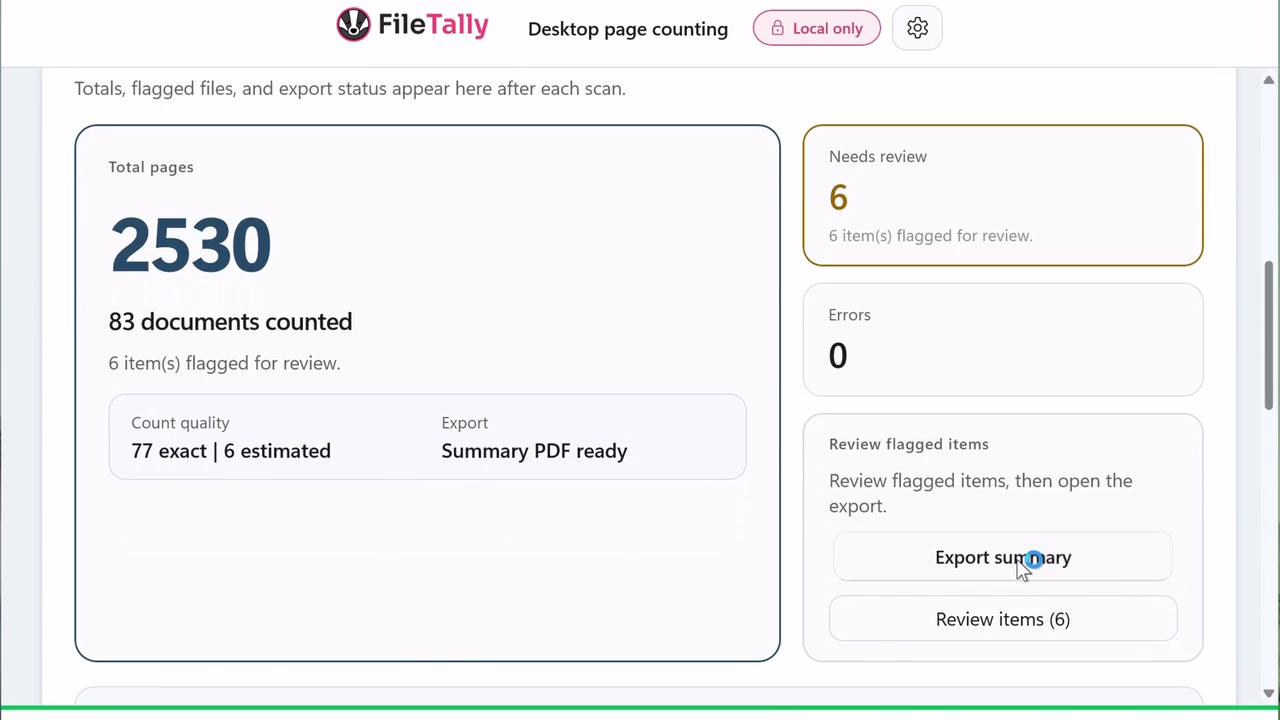
See exact counts and estimates separately. Review unreadable files and other exceptions before relying on the total.
Save a file-by-file CSV or XLSX, or a printable PDF summary. Results stay in the destination you choose.
See the Windows workflow
A product recording shows the scan and export process. Review the file results and any exceptions before using the total.
Exact counts, estimates and exceptions tell you how to read the result. A count is useful only when you understand its coverage.
Counted directly from the file. PDF pages, TIFF frames, slide counts. Review the source and coverage for your intended use.
Counted by a documented rule, like characters per page for text files. Labeled, so the recipient knows what is approximate.
Password-protected, corrupted or unreadable. Called out in the review queue with the reason, never counted silently.

Real folders are a mess of PDFs, Office files, scans, photos and email. FileTally counts the mix as it is.
| Format | How pages are counted |
|---|---|
| Exact page counts by parsing the file directly. | |
| Word DOC, DOCX | Word automation when Office is installed; document metadata otherwise. |
| Excel XLS, XLSX | Printed pages using Excel and its page layout. Without Excel, a worksheet-count fallback is marked Estimated. Cells are never counted as pages. |
| PowerPoint PPT, PPTX | One page per slide. |
| TIFF | Every frame in a multi-page TIFF. |
| Images JPG, PNG, BMP | One page each, or left blank. Your call. |
| Email MSG, EML | Outlook and standard email messages. |
| Text TXT | Estimated from configurable characters and lines per page. |
| ZIP | Supported archives extracted locally, then counted with everything else. |
A clean total when that is all someone needs. A file-by-file inventory with page count, type and path when they need more. CSV or XLSX, plus a printable PDF summary.


Local and private
You can open every file and write numbers on a pad. You can upload client files to a website. Or you can count the folder.
| Capability | FileTally | Open each file | Online page counters | PDF-only tools |
|---|---|---|---|---|
| Whole folder in one pass | Yes | No | Varies | PDFs only |
| Word, Excel, PowerPoint, TIFF, email | Yes | One app per type | Varies | No |
| Files stay on your PC | Yes | Yes | No, files are uploaded | Varies |
| Exact vs. estimated, flagged | Yes | No | Rarely | Rarely |
| Per-file CSV / XLSX export | Yes | Manual | Varies | Varies |
Try every feature free for 7 days. See the licensing details for current trial terms. If it earns its keep, buy it once.
Need 10+ licenses? Contact us for volume pricing.
Standard License
$24.99
One-time purchase. No subscription.
Total, once$24.99
Buy LicenseSomething else? Email support.
Put the PDFs in one folder (subfolders are fine), open FileTally, and drop or browse to that folder. FileTally reads every PDF in the tree, shows the total page count plus a per-file breakdown, and exports the list to CSV or XLSX. You never open the files one by one.
Select the folder in FileTally and it counts every supported file in one pass: PDF, Word (.doc/.docx), Excel (.xls/.xlsx), PowerPoint (.ppt/.pptx), multi-page TIFF, JPG/PNG/BMP images, Outlook .msg and .eml email, and text files. Supported ZIP archives can be extracted locally first for a fuller count.
Yes. FileTally counts .doc and .docx pages for a whole folder at once. When Microsoft Office is installed it uses Word automation for layout-accurate counts; without Office it falls back to document metadata and labels the result so you know how it was counted.
Yes. FileTally counts every frame in a multi-page TIFF as a page, so scanned productions and fax archives get a real page count instead of one per file.
No. FileTally processes documents locally on your Windows PC and does not upload their content for counting. A cloud-synced folder may already have uploaded files through another service. Licensing uses online activation and automatic lease renewal, with an offline grace window.
FileTally is a one-time purchase of $24.99 per license. There is no subscription. The license includes 12 months of updates, unlimited file processing, full CSV/XLSX/PDF export, and commercial use rights.
Yes. FileTally includes a 7-day full-feature trial. See the licensing details for current trial terms. No account or credit card is required to start the trial.
Yes. FileTally exports to CSV, XLSX and a printable PDF summary. The detailed export has one row per file with page count, file type, path and review status, ready to sort, filter or attach.
FileTally runs on Windows 10 and Windows 11. It requires .NET 8 Desktop Runtime, which is included in the installer. Install it with the signed direct installer or from the Microsoft Store.
FileTally is being developed for Windows, Mac, iPad and iPhone. Windows 10 and 11 are available now; native Mac, iPad and iPhone apps are coming soon.
Install it, point it at the folder, and get a total you can stand behind. A 7-day trial is available; see the licensing details for current terms.
Verify the download · Windows available now · Mac, iPad and iPhone coming soon